Five years of iPadOS: A Promising Start, but More Work Ahead

When Apple announced the separation of iPadOS from iOS in 2019, it felt like a watershed moment for the iPad. As someone who has been using and writing about the iPad since its inception, I was excited to see Apple acknowledging that the device deserved its own distinct operating system. The iPad had long outgrown its roots as a mere “big iPhone,” and it was time for its software to reflect that.

Key innovations and enhancements
Now, nearly five years later, iPadOS has indeed made significant strides. The Scribble feature enhances the handwriting and note taking ability of the Apple Pencil by letting people write directly on text fields which improves the text input experience. The Files app improvements have elevated the iPad’s file management capabilities, albeit not quite to desktop level. With Universal Control you can work on a Mac and an iPad simultaneously using one set of keyboard and mouse or trackpad.

Similarly, enhancements to multitasking in recent versions of iPadOS have made it easier to work with multiple apps simultaneously. Split View and Slide Over changed the way people use the iPad by allowing them to work with multiple apps much more easily. Stage Manager, though still a work in progress, takes this ability even further and shows the bigger potential of iPadOS.

On the hardware side, the debut of the M1-powered iPad made it truly a desktop computing class device allowing many other features to be unlocked or introduced. While the Smart Keyboard Folio allowed the iPad to serve as a laptop replacement for many, the Magic Keyboard which comes with a trackpad drives this even further even if it adds quite a bit of heft. Each new version gained brighter, sharper, and more precise display to deliver greater color accuracy and enhanced visual experience and specifically on the Pro line, thanks to ProMotion, True Tone, Retina XD, and P3 color gamut.

The introduction of the Pencil transformed the iPad into a robust tool for creative individuals across many fields and the new Pencil Pro only enhances that further with gyroscope support, haptic feedback, squeeze, and barrel roll capabilities. The iPad can also work with popular game controllers, by the way.

macOS on iPad is not the answer
Despite these improvements, iPadOS still has a long way to go before it can truly rival the functionality and flexibility of desktop operating systems like macOS. The file management system, for example, still feels clunky and limited compared to what’s available on a Mac. And while the multitasking features have improved, they can still feel confusing and unwieldy at times.

While there are calls for the iPad to run macOS altogether due to its clearly capable hardware systems, that’s ignoring the fact that it would take a mammoth multi-year effort to turn the macOS into not just a touch-capable platform but one that can actually feel at home with a touch interface. The macOS was never designed to be a touch-interaction system while the iPadOS was, so it would take comparably less effort to deliver enhancements to the iPadOS.

Part of the challenge lies in Apple’s own apparent uncertainty about the iPad’s role in its ecosystem. Is it meant to be a laptop replacement or a complementary device? After all, it is entirely possible to use the iPad without having a conventional computer in many use cases and situations but at the same time it still lacks a number of “desktop” system capabilities to convince people that it’s what they need as opposed to a traditional computer. On the other hand, Apple Vision Pro is looking more like the future of personal computing than the iPad now.

At the D8 All Things D Conference in 2010 the late Apple co-founder and CEO Steve Jobs likened PCs to trucks, suggesting that in the post-PC era, only a minority would need the full range of capabilities offered by conventional computers. However, perception may be the iPad’s biggest hurdle.

Is the Mac holding back the iPad?
There’s also the question of whether the recent resurgence of the Mac, driven by the success of Apple Silicon, has shifted Apple’s priorities away from the iPad. The iPad is 13 years old now but the introduction of the M1 chip brought incredible performance and efficiency to the Mac lineup, potentially leading Apple to refocus more resources on its traditional computing platform. However the company’s latest and most powerful and capable chip, the M4, debuted on the latest iPad Pro with Mac deployment of the chip still further down the line.

Regardless of the reasons behind it, iPadOS still feels like a work in progress. This is a shame because the iPad hardware has never been more powerful or capable. The M4 chip in the latest iPad Pro models is a marvel of engineering, and the Apple Pencil and Magic Keyboard add even more versatility to the device.

Maybe if they let the iPad run macOS there won’t be too many reasons left for people to buy the Macs? Although back in 2010 that was probably where the company was heading, trying to disrupt their own product before someone else does it for them. These days, though, sales of the Mac have been as strong as ever while iPad sales are not as big as they could have been.

iPad’s apps and perception problems
For the iPad to truly live up to its potential, Apple needs to continue pushing iPadOS forward. This means building on recent improvements but also thinking more boldly about what a modern tablet operating system should be capable of because with every release the iPad Pro has been the most cutting edge tablet computer on the market bar none. The hardware is always second to none while the software consistently leaves much room for criticism and improvements. Maybe it’s by design to prevent it from cutting into the Mac sales? A more robust file management system and a more streamlined multitasking interface seem to be what many people are crying for.

Additionally, Apple should strive to attract more developers to create apps optimized for the iPad’s larger screen and unique capabilities. Developers are keen to create best in class apps for the iPhone but on the iPad that enthusiasm doesn’t seem to be as high, perhaps understandably due to the significant difference in device popularity and also in complexity given the different capabilities and interface requirements carried by the iPad, and therefore the effort needed to create them.

There are apps for just about every category on the iPad. After all, the most popular apps on the iPad have been productivity or note taking apps such as Notability, Good Notes, and Microsoft Office, creative apps such as Procreate, Canva, and the Adobe suite, entertainment or streaming apps like Disney+, HBO/Max, Spotify, and Netflix, and education apps like Duolingo and Coursera. Despite this, people are still saying the iPad line doesn’t have the app they want or the apps do less than their desktop versions.

Google’s and Microsoft’s suites are examples of such apps. While their apps are popular on the iPad, people still resort to the desktop versions to be or feel more productive or to work faster and more efficiently thanks to certain missing features or capabilities, or because the workflow is different.

It’ll get there, one day

The good news is that Apple has shown a willingness to iterate and improve iPadOS over time. The past few years have brought meaningful changes to the platform, even if they haven’t always gone as far as some might have hoped. With the iPad’s hardware continuing to evolve rapidly, there’s every reason to believe that iPadOS will eventually catch up.

In the meantime, the iPad remains an incredible device for a wide range of tasks, from drawing and note-taking to video editing and music production. It may not yet be the laptop replacement some are hoping for but it remains an essential part of many people’s computing lives.

The potential is there for iPadOS to become a truly great operating system, one that fully unlocks the power and versatility of the iPad hardware. It may take longer than some of us would like but Apple will get there eventually.
Why Apple debuted the M4 on the iPad Pro instead of the Mac

I’m working on a longer piece about iPads but I just want to put this out first. Fast Company’s Harry McCracken sat down with Apple Senior Vice Presidents Greg Joswiak and John Ternus to talk about the latest iPad models that just came out this week.

I’ve been wondering why Apple decided to launch the M4 with the iPad, breaking “tradition” with previous M series chip releases. Apple did mention previously that this generation of iPad Pro wouldn’t have been possible without the M4 and there’s been plenty of dicsussions about the M4’s capabilities and significance, but for some, the M series had unofficially stood for “Mac”. It’s a high performance class chip designed to do deliver the most power but also incredibly long battery life. While it does make sense for it to eventually make it to the iPad, I didn’t expect a brand new version to debut on the iPad. It had debuted on a Mac and new versions had been showcased first on Macs, until now.

According to Joz, Apple’s engineers were able to incorporate in the M4 the capabilities they need to support the technologies they want to include in the latest iPad Pro, which was why they went with it.

That Apple is in a position to incorporate the technologies it needs into the chips it designs doesn’t just explain how it was able to build the thin, powerful iPad Pro. It’s also why the M4 is showing up first in the iPad Pro rather than a Mac: Rather than being a Mac processor repurposed for an iPad, it was conceived from the start to drive the iPad Pro’s new OLED screen.

“Our chip team was able to build that controller into the road map,” explains Joswiak. “And the place they could put it was the M4.”

This to me is a sign that Apple remains faithful to the iPad line despite years of seeming neglect in terms of the direction of the product. At some point the iPad was going to be the future of Apple’s computing, potentially replacing the Mac, at least for the masses, but with the release of Vision Pro and the resurgence of the Mac thanks to the M series chips, that plan isn’t so clear anymore. Maybe now the plan is to offer different devices for different types of consumers. I’ll get into that and more in the upcoming piece.

iPad line up proposal

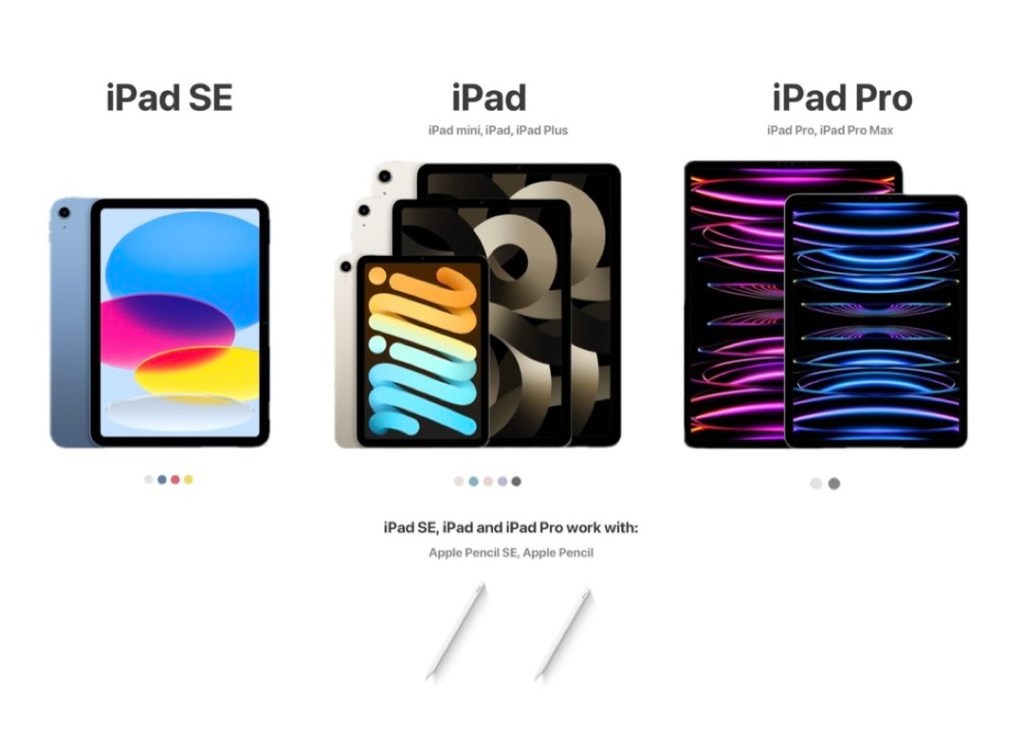
Let’s face it, the iPad line up is a little bloated if not confusing at the moment.

You have the 9th Gen iPad which carries all of the baggage of that generation’s iPad, the 10th generation iPad which overlaps so much with the iPad Air, the iPad Air itself which has lost all meanings thanks to the 10th Gen iPad, the iPad mini which can serve whole other categories of functions due to its diminutive size, and finally the iPad Pro that comes in two sizes.

Sebastiaan de With’s proposal here tries to align the product closer to the less confusing iPhone line up. While it doesn’t change the number of models, it gets rid of the 9th Gen and the original Pencil, introduces a low end iPad and adds a Plus model to the regular range.

I can agree with that and my details would be as follows:

When Apple introduces the 11th Gen regular iPad, the 9th Gen would be gone along with the original Pencil and any other lighting iPad accessory. That clears that table.

Let the low end iPad be the previous generation model with one or two color options, no cellular, and just one storage size because it’s meant to be the most accessible iPad that also serves the education market.

The standard iPad would include the mini and the Plus, all carrying the previous generation chipsets, obviously lower tech specs compared to the Pro, no high speed charging or connector just the widely acceptable one, and a single camera.

As for TouchID vs FaceID on the regular iPads, I lean towards TouchID unless they can lower the cost on that component.

The Pro will obviously be the flagship model with all the bells and whistles.

What about the Air? Right now the Air nomenclature is just that, a nomenclature. Functionally it serves as a confusing spot on the line up because the 10th gen iPad is too close to it but it carries a previous generation Pro chipset and features. They can keep the name for the regular iPad like how they kept the MacBook Air and Pro and got rid of the vanilla MacBook. That way they can have the iPad mini, iPad Air, iPad Plus all under the “regular iPad” class.

The Pencil will have two options, regular or Pro but there will be a hard separation. Only the Pro iPads can use either Pencil models while the non Pro iPad have to stick to the regular Pencil. That takes away the customer confusion. You want Pro features, get the Pro iPad. 

Although maybe the Pro Pencil can work with the regular iPads but it just won’t have the Pro features enabled. It’ll be like a high speed charging or data cable delivering at low speed because the host or target device doesn’t support high speed.

I’m not addressing the nearly Apple Watch level overwhelming range of SKUs here because there’s going to be multiple colors, storage sizes, and cellular vs WiFi models to worry about. 

The important element is is addressing the fundamental differences between the different iPad categories. Streamlining the product range this way will present a much more coherent set of options to the consumers. 

People will have an easier time deciding which model to get especially those figuring out if they should get the 10th gen iPad, the Air, or the smaller Pro model, and retail staff won’t be tearing their hair out helping customers figure it out.

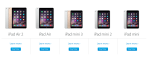
From  Watch to Phil Schiller. 2014 Apple products in one image.

Kidding aside, aesthetics is probably why they decided to omit the iPod series, the Mac mini, Apple TV, and the Mac Pro. Those products likely don’t fit the imagery they wanted to pass on.

Although if it’s simplicity that they were after, they certainly didn’t show it with the 2014 iPad offering. That’s about as confusing as it gets when it comes to an Apple product series, more so than the  Watch because even though the Watch has a ridiculous number of choices, technologically it’s really only one product with two different physical sizes whereas the iPad series goes back four generations.

Where I look at my own personal use of iPad and it’s a significant percentage of my computing work now.

Tim Cook, replying to Walt Mossberg at D11

I know you read all the blergs and the tweets but I feel like this comment was overlooked while he was being interviewed live.

I’ve met Apple Store managers—Managers—who told me that they got rid of their Macs because iPhone does everything they need. Now Apple’s CEO says his (admittedly hot stock-market-pleasing) tablet is doing a “significant percentage” of his computing.

Hang on, pause for dramatic effect.

Wow.

(via chartier)

Over 80% of my writing work now is done on the iPad mini and mobile phone, which at this time are an iPhone 4S and a Find 5 which I got to review from Oppo. The use of the Mac has been mostly relegated to whenever I need to recharge the battery on the iPad (gasp! it can run out of juice!) or when I need to use the iPad as a reference device.

On my daily travels, the Mac has stopped being a member of my backpack, in fact, i hardly ever carry a backpack anymore, just a small bag to carry the iPad along with the cables and plugs. And a battery pack.

I use iA Writer on all my three Apple devices. On the iPad, Photoshop Touch along with Snapseed are my two image editing tools. I want to use Poster to blog but the WordPress installation at work hasn’t been updated to 3.6, so I end up with the official WordPress app. The biggest problem with not using a Mac is I can’t get the embed code for tweets that I sometimes want to include in my posts, so I’m forced to resort to simple linking.

Currently I’m experimenting with doing video interviews using the iPad. It’s not as easy as writing.

Overall though, my workflow runs nicely without the Mac.

I want iOS to be modernized a bit more

The lack of gesture support on the iPod touch and iPhone makes for an awkward moment when you’re far more used to using the iPad which has a greater range of gesture recognition.

Not being able to do things like switching between apps simply by swiping from the side edges of the screen as opposed to a four finger swipe on the iPad or closing the app by pushing up from the bottom of the screen makes these tall screen devices feel rather quaint and underdeveloped.

I realize that Apple can be both revolutionary and conservative with regards to introducing interface features but after more than five and a half years of iOS, it needs a little more of the modern abilities not just to compete with offerings from other platform providers but also as a milestone in its own software development roadmap.

As it stands, the iPhone remains a safe bet for consumers who don’t want to have to learn too many new things as its comes with arguably the easiest and simplest mobile OS to learn and use.

I’ve got high hopes for Jony Ive to reboot iOS. – Read on Path.

Thought via Path

Forgot I have iA Writer on the Mac. The lack of an always connected iPad kind of added to that problem. This mini is probably going to let me be more productive since I won’t have to worry about lack of connection but more importantly, it’s so much lighter and smaller than that old first generation iPad that I can type a lot faster and more comfortably.

I can’t understand why Apple doesn’t have TextEdit for the iPad which would let people switch between the Mac and the iPad or iPhone a lot more seamlessly. For those who want more complex layout, collaboration, and formatting ability, there’s Pages, but those who just need to hammer out words, we need a simpler cloud-based app. iA Writer is the perfect app for that.

Apple probably squandered an opportunity there, but then it would have taken sales away from Pages. – Read on Path.

Finding features in iPhoto for iOS

In delivering software user interfaces, there has always been differing lines of thought. One major thinking is to provide absolutely everything in full view, regardless of usefulness or practicality. This allows users to be aware of everything that the software is capable of doing, providing them with complete visible access to its features. Another is to only show the features that are most likely to be used and hiding the rest for users to discover as they become more familiar with the software.

The user interface in iPhoto for iOS seems lie somewhere between the two. Visually it’s a bit of a clutter but it also still has hidden features not accessible through the on-screen buttons and icons. Unfortunately those hidden features are very unlikely to be discovered unless people had seen the on stage demo when the app was introduced or that they read reviews and guides for the app on the Internet.

Apple has had a habit of hiding operational functions but in most cases, there are two ways to access them. One is through the standard visible interface elements such as buttons or other visual cues, another is through keyboard shortcuts on Macs or touch gestures on iDevices. Rarely would an operational feature be accessible only through one non-obvious mean of access and when it is, it tends to be pro features that the majority of users won’t likely to use in the first place.

Lukas Mathis put forward a number of hidden actions on iPhoto for iOS that may seem intuitive for Apple’s engineers and designers but not so much to unsuspecting users. Apple’s apps are supposed to be intuitive for new users but some of these hidden actions seem like they’re not meant to be discovered. Mathis has a pretty damning sentence for iPhoto for iOS:

Almost nothing you learn in iPhoto can be applied to Photos, or to any other iOS app. In fact, being proficient at using iPhoto will probably make you worse at using Photos.

I received an unexpected package on Saturday. It said Family Matters at the back in handwritten marker text and it had just one label to secure the fold which said “Others” with a logo that looks like a door. Even after I opened the package, it took me a while to realize that it wasn’t a package regarding family issues, it was from a brand new home decor and accessories company called Family Matters, run by two young moms from Bandung, Indonesia.

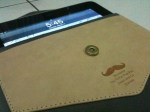
Inside the neatly wrapped package was a svelte, gray suede, leather-lined iPad sleeve. No markings on the product aside from a laser engraved picture of a mustache and a terrible pun telling you to put your iPad down, printed on a leather patch over the suede. The patch itself acts as a pouch that you can use to store cards, paper slips, cash, earphones, or other thin objects. A magnetic flap would secure the iPad inside while the inside of the sleeve is made of leather. 

At a glance it may look too thin to fit the original iPad but it does fit very snugly. The leather material inside also acts as a wipe to clean the screen as you slip the iPad in and out. The product description says it fits iPad 1 and 2 but of course it fits the new iPad as well given that the original iPad is still the thickest of them all.

The point of the sleeve is to stow your iPad away while you’re not using it and of course, with the sleeve being a tight fit, it would disqualify most protective products other than thin film sheets from being used with the iPad. Unfortunately this means the iPad will be left unprotected when in use.

This iMustache sleeve feels quite premium thanks to the smooth suede and leather. As with most iPad sleeves it does offer only a basic protection due to the lack of padding but it feels really nice and is very well made. It looks so good I want to hang it on my wall instead of using it for my iPad. I don’t have the heart to ruin its shape by stuffing my old iPad inside.

The iMustache sleeve is available online from Family Matters for Rp 225,000 (US$25). For a product this good, it’s a serious steal. I hope it’s only an introductory price. I don’t know if they ship internationally, you have to ask them.

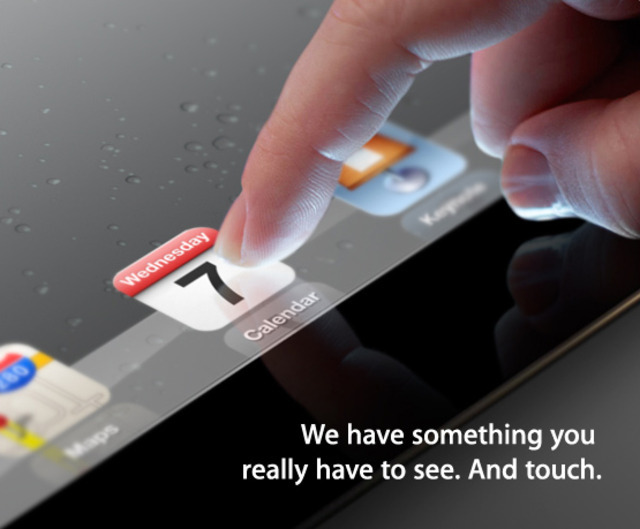
Official: Apple iPad 3 event slated for March 7th in San Francisco | The Verge

Yerba Buena, San Francicso, Wednesday, 10 am Pacific Time. No CNBC, it’s not going to be in New York.