Finding features in iPhoto for iOS

In delivering software user interfaces, there has always been differing lines of thought. One major thinking is to provide absolutely everything in full view, regardless of usefulness or practicality. This allows users to be aware of everything that the software is capable of doing, providing them with complete visible access to its features. Another is to only show the features that are most likely to be used and hiding the rest for users to discover as they become more familiar with the software.

The user interface in iPhoto for iOS seems lie somewhere between the two. Visually it’s a bit of a clutter but it also still has hidden features not accessible through the on-screen buttons and icons. Unfortunately those hidden features are very unlikely to be discovered unless people had seen the on stage demo when the app was introduced or that they read reviews and guides for the app on the Internet.

Apple has had a habit of hiding operational functions but in most cases, there are two ways to access them. One is through the standard visible interface elements such as buttons or other visual cues, another is through keyboard shortcuts on Macs or touch gestures on iDevices. Rarely would an operational feature be accessible only through one non-obvious mean of access and when it is, it tends to be pro features that the majority of users won’t likely to use in the first place.

Lukas Mathis put forward a number of hidden actions on iPhoto for iOS that may seem intuitive for Apple’s engineers and designers but not so much to unsuspecting users. Apple’s apps are supposed to be intuitive for new users but some of these hidden actions seem like they’re not meant to be discovered. Mathis has a pretty damning sentence for iPhoto for iOS:

Almost nothing you learn in iPhoto can be applied to Photos, or to any other iOS app. In fact, being proficient at using iPhoto will probably make you worse at using Photos.


I received an unexpected package on Saturday. It said Family Matters at the back in handwritten marker text and it had just one label to secure the fold which said “Others” with a logo that looks like a door. Even after I opened the package, it took me a while to realize that it wasn’t a package regarding family issues, it was from a brand new home decor and accessories company called Family Matters, run by two young moms from Bandung, Indonesia.

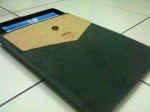
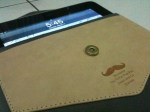
Inside the neatly wrapped package was a svelte, gray suede, leather-lined iPad sleeve. No markings on the product aside from a laser engraved picture of a mustache and a terrible pun telling you to put your iPad down, printed on a leather patch over the suede. The patch itself acts as a pouch that you can use to store cards, paper slips, cash, earphones, or other thin objects. A magnetic flap would secure the iPad inside while the inside of the sleeve is made of leather. 

At a glance it may look too thin to fit the original iPad but it does fit very snugly. The leather material inside also acts as a wipe to clean the screen as you slip the iPad in and out. The product description says it fits iPad 1 and 2 but of course it fits the new iPad as well given that the original iPad is still the thickest of them all.

The point of the sleeve is to stow your iPad away while you’re not using it and of course, with the sleeve being a tight fit, it would disqualify most protective products other than thin film sheets from being used with the iPad. Unfortunately this means the iPad will be left unprotected when in use.

This iMustache sleeve feels quite premium thanks to the smooth suede and leather. As with most iPad sleeves it does offer only a basic protection due to the lack of padding but it feels really nice and is very well made. It looks so good I want to hang it on my wall instead of using it for my iPad. I don’t have the heart to ruin its shape by stuffing my old iPad inside.

The iMustache sleeve is available online from Family Matters for Rp 225,000 (US$25). For a product this good, it’s a serious steal. I hope it’s only an introductory price. I don’t know if they ship internationally, you have to ask them.

dailylicious2:

The new iPad. Deeeeeelicious. iLife for iOS is now complete, iPhoto for iPad and iPhone available from App Store for $4.99. There’s also a new AppleTV.

Regis McKenna thinks Apple’s 1984 ad is overrated

He has his reasons and if you know the follow up to 1984, which was called Lemmings, it rings even more true to his criticism and remarks about Apple being shunned by the enterprise market. Lemmings carried a much stronger message than 1984 and because of it, it fell flat. It was a disaster.

The article though, resonated with me not because of his criticism of the ad but for how Apple handled the iPhone 4 antenna issue. It never was bigger than most other problems with the phone but due to the media beat up, it felt worse. As it turned out, within 10 days the issue disappeared. Apple did redesign the antenna for the 4S but to me it had always felt like Apple was doing it more for the public relations effect than for strictly technical reasons.

Oh and it’s yet another claim over the inaccuracies of Walter Isaacson’s book on Steve Jobs.

Regis McKenna thinks Apple’s 1984 ad is overrated

People are using the app, but they’re not checking in,” he told me. “I asked myself: did we break something? But in fact, it’s because people are using Foursquare to look for where their friends are, to find things, and as a recommendation service. It’s almost like it doesn’t occur to them to check in.

Dennis Crowley. Exactly what I was saying the other day:

//platform.twitter.com/widgets.js

LOL

//platform.twitter.com/widgets.js

Twitter Moves To Monetize Mobile

parislemon:

Promoted Tweets — read: ads — are coming to the Twitter mobile client streams. I suspect the initial reaction will be: “Great! Another reason to use TweetBot!”

But I actually don’t view this as a negative thing. Twitter is a service that many of us use and love for hours on end every single day. It’s a great service. But like any great service, if it’s to stick around, it needs to make money. I don’t begrudge them trying to do that.

They’ve been experimenting with various ways to do this, and apparently the Promoted Suite of products is working well enough that they’re now expanding it to the mobile experiences. In fact, a Promoted Tweet was the most retweeted Tweet last year.

It’s interesting that Twitter only gets paid when a user takes an action (retweet, reply, etc) on these Tweets. In other words, they’re cost-per-action not cost-per-impression. Again, a good choice because it will naturally lead to higher quality Tweet Ads (or retweet-bait, I suppose). 

And hey, at least it’s not the DickBar.

Twitter Moves To Monetize Mobile

Official: Apple iPad 3 event slated for March 7th in San Francisco | The Verge

Yerba Buena, San Francicso, Wednesday, 10 am Pacific Time. No CNBC, it’s not going to be in New York.

Windows Phone cannot maintain a Skype call in background

I downloaded Skype for Windows Phone as soon as I found out about the app. Although I don’t use Skype that much, it’s one of those apps that you just have to have on your phone. Funny that somehow Skype is beginning to be forgotten in this part of the world thanks to mobile text messaging apps like BlackBerry Messenger and WhatsApp. Skype is much more flexible and has a desktop interface, something that iMessage also has.

Anyway, the article on Ars Technica points out one flaw in Windows Phone’s app switching ability which is the lack of a persistent VoIP support. Apparently if you’re on a Skype call and you need to switch away to another application, say to look at a map or refer to an email, the call gets dropped.

This and the lack of USSD support are significant omissions from Windows Phone that needs to be remedied quickly. It is surprising that Microsoft had not included support from the beginning.

Windows Phone cannot maintain a Skype call in background

Samsung lied in its latest Galaxy Note video

Samsung Mobile USA put up a video this week showing several tasks that supposedly the iPhone can’t do but can be easily done on a big ass 5-inch Galaxy note with a stylus. A STYLUS! How 1994.

Of course, when Tap Magazine found out about it, they went to work on rebutting every point in the video by doing everything it said the iPhone can’t do, on an iPhone. Including shooting and editing the video.

Samsung lied in its latest Galaxy Note video