
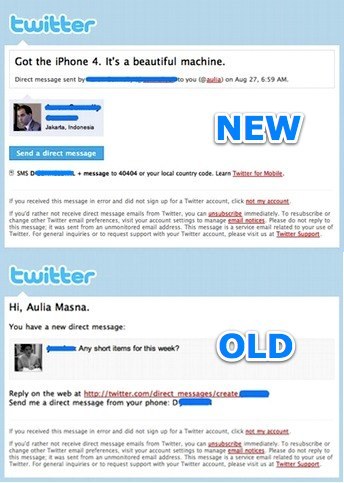
Seems that Twitter today updated their direct message email notification. In the new format, the content of the message finally takes priority billing and it includes much more information about the message itself such as the line that says, “Direct message sent by (sender) to (receiver) on (date).”
While the information was already there in the older format, this one line makes it that much easier for people to identify the nature of the email.
You can now send a direct message back to the sender (provided the person also follows you) by clicking on a button on the email and it will take you to the Twitter page already set up to send the message once you’ve signed in.
It also includes an instruction to send a direct message via SMS should you prefer to do so.
If you haven’t set up to receive your Twitter direct messages by email, you should, it makes messaging that much more effective and efficient. You can set this up by going to Settings > Notices> and clicking on the check box for Direct text email.
If you wish, you can also set up to receive direct message via SMS by going to Settings > Mobile, and activating device updates. By default you will not receive updates from anyone unless you go to their Twitter pages and turn on tweet notification, so your phone won’t be flooded with constant updates from everyone you follow.
Footnote: If you’ve set up to receive direct message via third party services such as Topify, there’s a chance your message won’t be shown. This could be a side effect of the new email format from Twitter. I don’t know for sure, but it’s certainly possible.
My suggestion is if you use such a service, keep direct messages out of it. If the service goes down for maintenance or breaks down, you won’t get your DM emails. At least with Twitter, you rely on it directly instead of on some middleman.
 AuliaSays